
Prior to Exam Day:
-
Review emailed instructions from KPSOM Assessment
-
Review documents and complete instructed tasks below:
-
Pick up your tripod. (M1 Students during First Exam Only) Pick up zone is at the Tech Bar, M-F 8am-5pm.
- If you already have a tripod from a previous assessment please continue to use that.
- If your tripod is lost or stolen please contact the Office of Assessment & Evaluation.
-
Self-certify your laptop. Make sure you certify your laptop to avoid any unnecessary stress or last-minute anxiety.
Send an email to KPSOMIT@kp.org confirming that you have certified your laptop. Please consult with KPSOM IT personnel by email, phone (626-564-7500), or in person at the Tech Bar if you run into any issues.
Night Before Exam Day:
Fully charge all 3 devices needed for the exam:
- KP laptop
- KP cell phone
- Personal cell phone
No other electronic devices are permitted during an exam. This includes (but is not limited to):
- Headphones or Earbuds
- Electronic Watches
- Tablets
- Calculators (one is provided in the NBME Secure Browser)
On Exam Day:
-
Follow the guide Mac: Exam Day - Taking the NBME Exam for instructions on what to do on your laptop for the NBME Browser
-
Log in to Zoom on your KP iPhone promptly by 8:30AM.
- Follow the guide KPSOM Zoom for Mobile for instructions.
- Ensure that you are displaying your first and last name in Zoom
-
Prepare: Make sure...
- You are in an area that is empty and quiet with no other persons in your testing area
- You have your KP ID badge
- You have 2 blank pieces of scratch paper
-
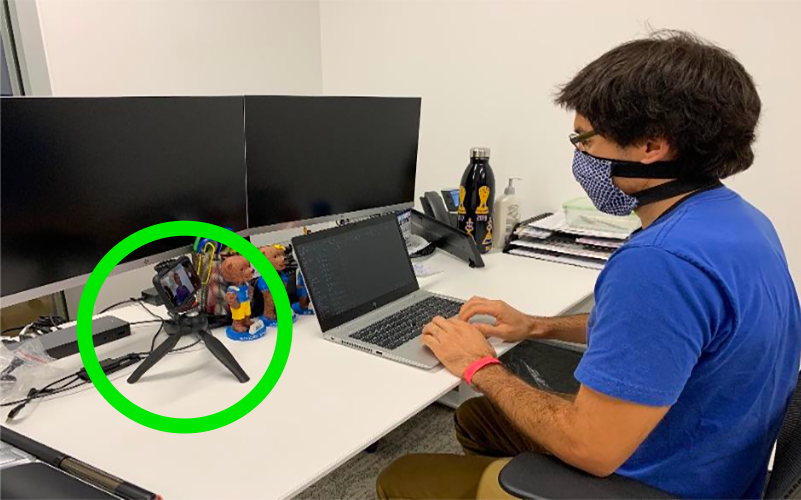
Set up your Tripod and Cell Phone properly...
- Follow the guide Cell Phone Instructions for Remote NBME Exam
- Remember to turn your KP iPhone volume DOWN during the exam
- Remember to keep Zoom's Audio and Video ON for Proctoring
- Place your cell phone in landscape orientation
- Put your phone on DND mode (with KPSOM contact in Favorites)
- Follow the guide Cell Phone Instructions for Remote NBME Exam
-
Ensure that your proctor can view your face, arms, and keyboard at all times (please see the image below for reference)
-
During the Exam...
- Pay close attention to the instruction of your assigned proctor
- Please be aware that exam sessions are recorded
- If you have any problems or issues during the exam, please contact your assigned proctor immediately. This includes but is not limited to:
- Bathroom breaks are discouraged, as the exam clock runs during break time.
- If you must take an unscheduled break, please contact your proctor
- If you drop off Zoom due to an internet or laptop error (you may receive a phone call from your proctor or KPSOM IT).
- KP iPhone loses connection to Zoom (the Proctor needs to know why A/V is lost)
-
When you have completed the Exam...
- Once you have completed your exam, contact your proctor.
- Once the proctor has confirmed that you have successfully completed your exam, you will exit from the breakout room and return to the main room with the Chief Proctor.
- The Chief Proctor will ensure you have successfully submitted your exam.
- Once exam submission is confirmed, you will tear/shred your scratch papers.
- This needs to be completed in view of your proctor.
-
Once you have completed the checkout process, the Chief Proctor will dismiss you.
Comments
Please sign in to leave a comment.